How to Use AI for Small Business: A Complete Beginner’s Guide for 2026
If you’re trying to figure out how to use AI for small business, you’re not alone. Here’s a stat that should make every small business owner pause: 77% of small businesses now use AI in some form, yet most owners I talk to still feel completely lost about where to start. Sound familiar?
I get it. Six months ago, I was helping a friend who runs a two-person landscaping business figure out how to use ChatGPT. He’d already watched three YouTube videos and read a dozen articles, and he was more confused than when he started. By the end of our 45-minute call, he had ChatGPT writing his customer follow-up emails, drafting his Google Business posts, and outlining bids for new jobs. Same tool, same business owner; just a clearer path.
The problem isn’t AI itself. It’s that almost every guide out there is either written for developers (full of jargon you don’t need) or hype-driven marketing fluff (lots of promises, zero practical steps).
This guide is different. No coding required. No “AI will transform everything!” hype. Just real, practical ways small business owners are using AI right now to save hours every week, cut costs, and compete with bigger teams, all explained in plain English.
By the end of this article, you’ll know exactly which AI tools to start with, what to use them for, and how to build a practical AI implementation for your small business, including the right business AI strategy, real-world AI applications, and how to integrate them into your daily workflow without overwhelming yourself or your team. Let’s dive in.
How to Use AI for Small Business (And Why It Matters)
Let’s start with the basics, because if you’re going to use AI in your business, you should at least understand what you’re using, minus the computer-science textbook.
Plain-English Definition
Artificial intelligence for small business boils down to this: software that can do things we used to think only humans could do, like reading, writing, summarizing, recognizing patterns, answering questions, and generating images. Generative AI business uses are the most common kind you’ll encounter: tools that generate new content like text, images, and code on demand. Machine learning is the engine underneath. Instead of being programmed with rigid rules, the system “learns” by chewing through huge amounts of data and figuring out patterns on its own.
When you type a question into ChatGPT and it answers in fluent English, that’s machine learning at work. Nobody hard-coded those answers. The system was trained on a massive corpus of text and learned how words tend to follow other words in useful ways. That’s it. That’s the “magic.”
AI Hype vs. What AI Actually Does for You
If you read tech press, you might think AI is about to replace your accountant, your marketing agency, and possibly your dog. The reality, especially for small businesses, is much more boring, and much more useful.
Right now, AI is excellent at: summarizing long documents, drafting first versions of emails and posts, brainstorming ideas, answering common customer questions, transcribing meetings, generating images for social media, and pulling structured data out of messy text. It is not great at: making nuanced judgment calls, understanding your specific customers without context, or being trusted with sensitive client decisions on its own.
The mental model that works: AI is a fast, cheap, slightly overconfident intern who never sleeps. You wouldn’t fire your senior staff and let an intern run the company, but you’d absolutely have them draft emails, organize notes, and pull together first drafts of reports.
Why 2026 Is the Tipping Point
A few years ago, using AI in a small business meant either paying enterprise prices or hiring a developer. Today, affordable AI tools, including a growing wave of no-code AI tools built specifically for non-coders, cost between $0 and $20 a month, run in your browser, and require zero technical skill. Small business AI adoption has crossed from “early movers” to mainstream, and the businesses that lean in now are building a real AI competitive advantage over the ones still on the sidelines.
At the same time, your competitors are catching on. The small businesses that adopted AI in 2024 and 2025 are now publishing more content, responding to customers faster, and shipping more proposals than the businesses that haven’t. That gap will keep widening.
Common Myths Worth Killing
- “It’s expensive.” Most small businesses can run their entire AI stack for under $50/month, and many start free.
- “It’s complicated.” If you can write an email, you can use ChatGPT. The interface is literally a text box.
- “It will replace humans.” In small businesses, AI mostly replaces tasks, not people. The owner who used to spend three hours on a proposal now spends thirty minutes editing an AI draft, and writes more proposals.
- “It’s only for tech companies.” Plumbers, dentists, bakers, and bookkeepers are quietly some of the heaviest AI users right now.
The Real ROI
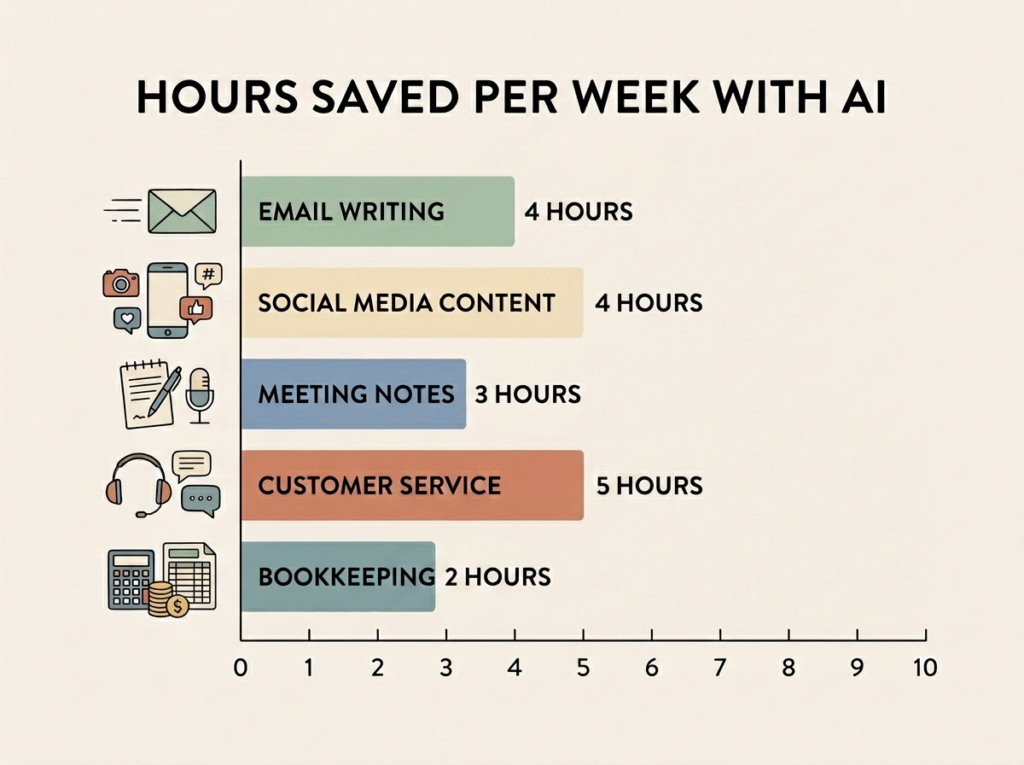
When I survey small business owners who’ve been using AI consistently for at least three months, the typical answer is somewhere between 5 and 15 hours saved per week. That’s not an exaggeration. That’s the math when you stop writing every email from scratch, stop hand-drafting every social post, and stop transcribing your own meeting notes.
If your hourly rate (or opportunity cost) is $50, ten hours a week is $2,000 a month in recovered capacity. Set that against a $20/month tool, and the ROI argument basically writes itself.
7 Ways Small Businesses Are Using AI Right Now
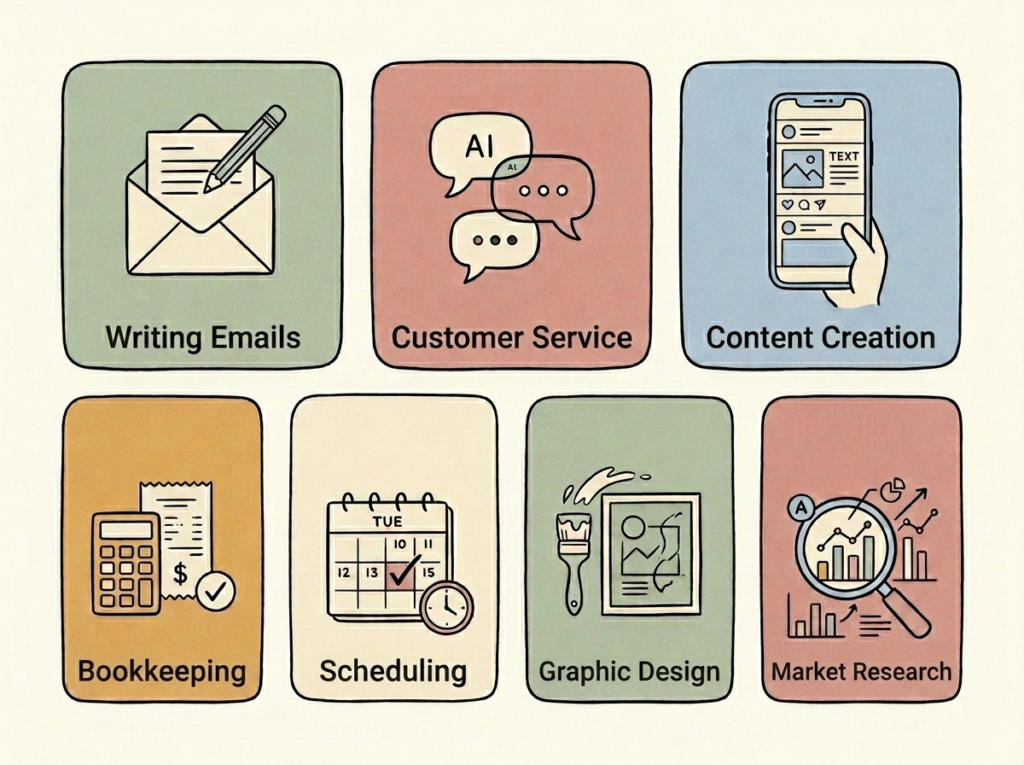
Forget abstract use cases. Here are seven concrete jobs AI is already doing for real small businesses, with examples you can copy this week.
1. Writing Emails, Blog Posts, and Marketing Copy
This is the gateway drug. AI email tools like ChatGPT, Gemini, and Microsoft Copilot turn email drafting into a 10-second task. You give the tool a rough idea, such as “draft a follow-up email to a client who hasn’t responded in two weeks, friendly tone, mention the proposal we sent,” and it produces a clean first draft almost instantly.
Real example: Maria runs a six-person bookkeeping firm. She used to spend roughly four hours every Friday writing client newsletter content. Now she spends 45 minutes editing AI drafts and pushes the same volume of content. Same voice, a fraction of the time.
2. Customer Service and Chatbots
AI chatbots can handle the 80% of customer questions that are basically the same questions, over and over: hours, pricing, location, return policy, appointment availability. Tools like Intercom Fin, Tidio, and Drift let you set this up without writing code.
Real example: a two-location dog grooming business deployed a Tidio bot trained on their FAQ. Within a month, after-hours bookings went up 30% because customers could check availability and request slots at 11 p.m. without waiting for a human.
3. Social Media Content and Scheduling
AI is exceptional at brainstorming and drafting social posts. Tools like Buffer, Hootsuite, and Later have built-in AI assistants that’ll generate captions, suggest hashtags, repurpose a single blog post into a week of content, and schedule the whole batch in one sitting.
Real example: Jay, a personal trainer with a one-person business, batches a month of Instagram captions in 90 minutes using ChatGPT plus Buffer. He used to dread posting; now it’s a Sunday morning routine.
4. Bookkeeping, Invoicing, and Financial Admin
Modern bookkeeping software (QuickBooks, Xero, Wave) now uses AI to categorize transactions, flag anomalies, and chase late invoices automatically. Tools like Ramp and Brex use AI to scan receipts and reconcile expenses without you ever opening a spreadsheet.
Real example: a solo consultant I work with used to spend the last Saturday of every month doing bookkeeping. After moving to QuickBooks with auto-categorization plus a Dext receipt scanner, that Saturday is now free. The AI doesn’t do everything, but it does the boring 80%.
5. Scheduling, Calendars, and Meeting Notes
Two of the highest-leverage AI tools for any service business: AI scheduling software (Calendly with AI features, Reclaim, Motion) that acts like an AI virtual assistant for your calendar, and a meeting note-taker (Otter, Fireflies, Fathom). Combined, they’re easily the biggest small business efficiency unlock most owners discover in their first 30 days with AI.
Real example: I started using Fathom on every client call about a year ago. It records, transcribes, and produces a summary with action items in under two minutes after the call ends. I haven’t taken a manual meeting note since. The summaries are better than what I used to write, because I was usually trying to listen and type at the same time.
6. Graphic Design and Visual Content
Canva’s AI features (Magic Design, Magic Write, background remover) plus dedicated AI image generation tools like Adobe Express, Midjourney, and DALL-E mean you can produce social graphics, blog headers, and basic marketing assets without ever opening Photoshop or hiring a designer for the small stuff.
Real example: a boutique coffee roaster uses Canva’s Magic Design to spin up monthly menu boards, Instagram story templates, and bag label mockups. The owner has zero design background, yet the output looks professional enough that customers regularly compliment the branding.
7. Market Research and Competitor Analysis
Drop a competitor’s website URL into ChatGPT or Claude and ask for a SWOT analysis, a positioning summary, or a list of their main offers and pricing tiers. Use Perplexity to research a niche with cited sources. Use SparkToro or Exploding Topics for audience and trend data.
Real example: a new wedding photographer used ChatGPT to analyze the websites and Instagram of the top ten photographers in her city, identify common pricing tiers and packaging language, and build a positioning brief. What used to be a week of research became an afternoon.
How to Get Started With AI in Your Small Business (Step-by-Step)
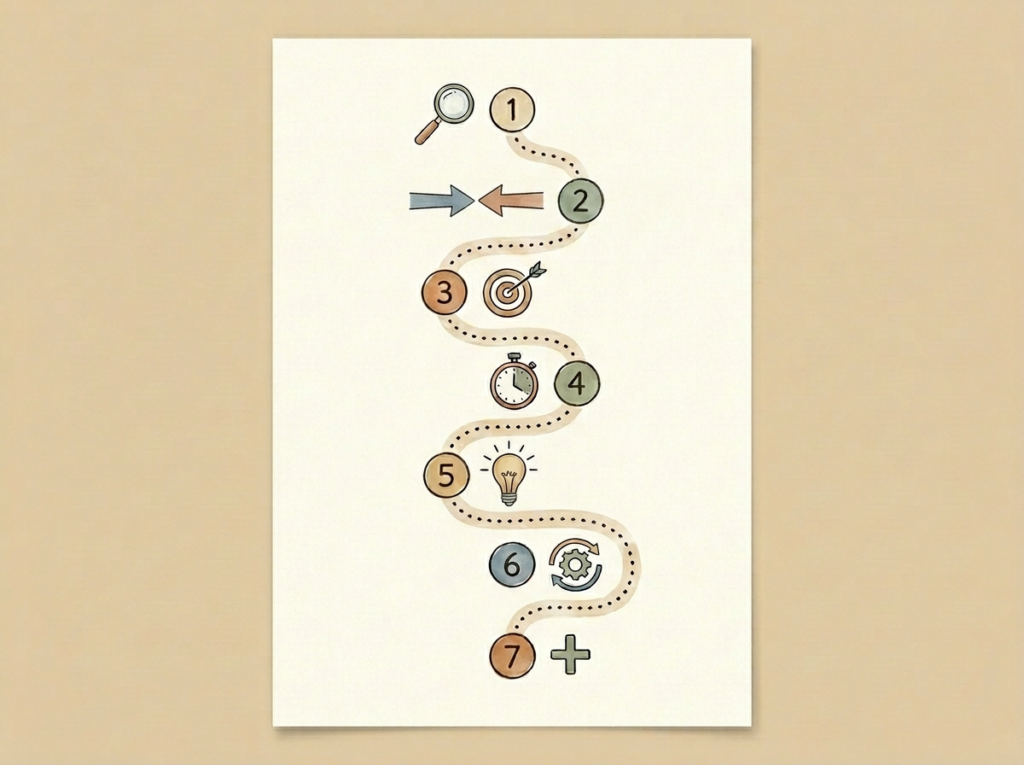
If you’ve read this far and you’re thinking, “Okay, but where do I actually start?” this is the section for you. The biggest mistake I see is people opening ChatGPT, typing “help me with my business,” getting a generic answer, and concluding that AI is overhyped. There’s a better way.
Step 1: Identify Your Biggest Time-Wasters
For one week, keep a rough log of where your time is actually going. Don’t over-engineer this; just jot down the tasks that drain you. Common offenders: writing the same kinds of emails over and over, creating social posts, summarizing meetings, drafting proposals, formatting invoices, answering repeat customer questions. These are exactly the kinds of repetitive workflows that small business automation, and specifically AI automation for small business, handles best.
Step 2: Match Pain Points to AI Use Cases
Take your top three time-wasters and pair each with an AI use case from the section above. “Writing client follow-up emails” maps to ChatGPT. “Creating Instagram posts” maps to Canva plus ChatGPT. “Meeting notes” maps to Fathom or Otter. You’re not picking everything yet; you’re mapping the territory.
Step 3: Pick ONE Tool to Start With
Resist the urge to subscribe to four tools at once. Pick the single tool that addresses your biggest pain point. For most people new to AI, that tool is ChatGPT (or Claude, or Gemini; they’re close enough that the choice barely matters at the start). Sign up. Start free. Don’t pay for anything yet.
Step 4: Set Aside 30 Minutes for a Real Learning Session
Block thirty undisturbed minutes on your calendar. Coffee, no phone, no meetings. This is your first session of AI training for small business owners: short, focused, and tied to real work. Open the tool, and instead of asking it abstract questions, give it a real task from your business. Have a draft proposal you need to write? Paste your notes and ask it to draft a first version. Have a long email thread to summarize? Paste it and ask for the three key decisions made.
Step 5: Apply It to a Real, Low-Stakes Task
Don’t use your first AI output for something that matters. Use it for something where, if it’s mediocre, no one will care. A draft of a routine internal update. A first version of a job posting. A brainstorm list. You’re trying to learn the rhythm of working with AI, the prompt-review-refine loop, not bet the business on it.
Step 6: Refine Your Approach Over the First Week
After a week, you’ll start noticing patterns. Certain prompts work better. The tool sounds more “like you” when you give it samples of your past writing. Certain tasks are great fits, others aren’t. Adjust. The skill of working with AI is iterative; you get sharper every week if you’re paying attention.
Step 7: Add a Second Tool Only Once the First Is Habit
When using ChatGPT (or whichever tool you picked) is genuinely automatic, something you reach for without thinking, add a second tool. Maybe a meeting note-taker. Maybe Canva’s AI features. The compounding effect is real: each new tool gets easier to learn because you already understand the pattern.
The Best AI Tools for Small Business Owners in 2026
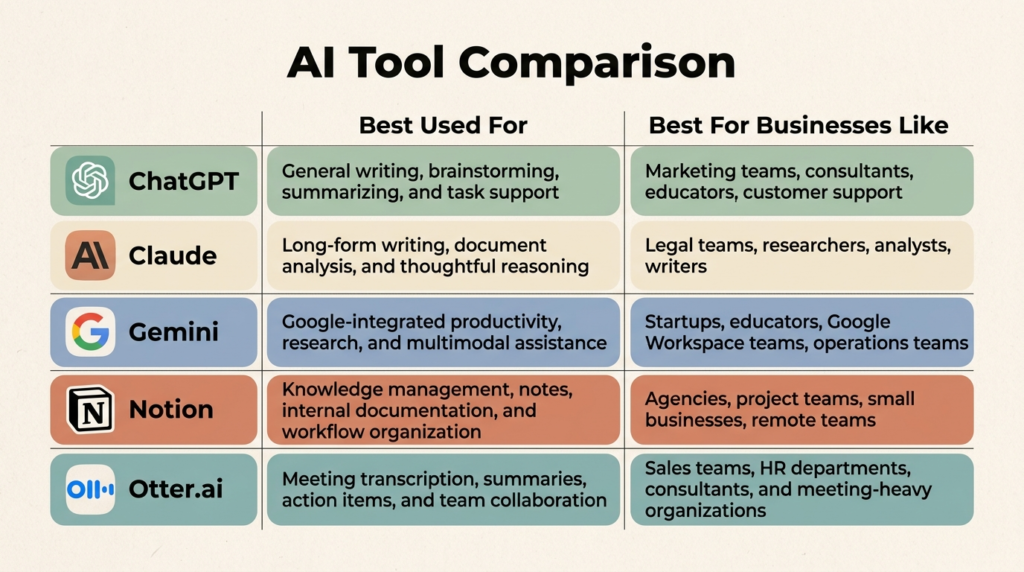
There are now thousands of AI tools. You don’t need most of them. Here’s the short list that covers 90% of small business needs.
ChatGPT: The All-Purpose AI Assistant
If you only use one AI tool, make it ChatGPT (or its peers). Free tier is genuinely useful. The $20/month Plus tier gives you access to the most capable models, image generation, file uploads, and custom GPTs. Use it for: writing, research, summarizing, brainstorming, coding, translation; basically anything text-based. Think of it as a general-purpose AI virtual assistant that handles the bulk of your everyday thinking and writing tasks.
Jasper or Copy.ai: Content Marketing at Scale
If your business publishes a lot of marketing copy, dedicated tools like Jasper and Copy.ai layer brand voice training, templates, and team workflows on top of the base AI models. Worth the subscription if you’re producing meaningful content volume; overkill if you’re writing one post a week.
Notion AI: Notes, Meetings, and Projects
Notion AI lives inside your existing notes, docs, and project pages. It’ll summarize, rewrite, translate, and pull action items from anything you’ve written. If your team already lives in Notion, turning on AI is probably the highest-leverage $10/month you’ll spend.
Zapier or Make: Automating Repetitive Workflows
These aren’t pure AI tools, but both now embed AI deeply into their automation workflows. Example: “when a new lead form is submitted, use AI to score the lead, draft a personalized follow-up email, add them to my CRM, and notify me on Slack.” That’s one Zap. It runs forever.
Canva AI: Graphic Design Without a Designer
Canva’s Magic Design, Magic Write, background remover, and AI image generator together cover almost any visual need a small business has. The free tier is generous; the Pro tier ($15/month) unlocks the heavy AI features.
Otter.ai or Fireflies: Meeting Notes and Transcription
Both join your Zoom, Google Meet, or Teams calls automatically, transcribe everything, and produce searchable summaries. Fathom is also excellent and has a generous free tier. Pick one and never take a meeting note manually again.
ChatGPT vs. Claude vs. Gemini
Quick AI tools comparison: all three are excellent. ChatGPT (OpenAI) is the most well-known and has the broadest ecosystem. Claude (Anthropic) tends to write more naturally and handles long documents particularly well. Gemini (Google) integrates deeply with Google Workspace, which is huge if your business runs on Gmail, Docs, and Sheets. You don’t need all three. Try one for a month, then maybe sample another. This is the kind of low-stakes experimentation that separates AI vs traditional tools in your workflow: you can switch with no migration cost.
Real-World AI Use Cases by Business Type
The use cases above are generic. Here are small business AI examples drawn from different kinds of businesses, because what works for a freelance designer doesn’t look identical to what works for a five-location restaurant group. Each one is a snapshot of when to use AI in business, and where to leave it on the bench.
Service-Based Businesses (Consultants, Coaches, Freelancers)
Your highest-leverage AI uses: proposal drafting, meeting transcription with summaries, client follow-up emails, and content marketing for inbound leads. AI essentially gives you a part-time admin assistant for free. A solo consultant who used to take on six clients can comfortably take on eight or nine without burning out.
Local Businesses (Restaurants, Salons, Retail)
Your wins are mostly customer-facing: AI chatbots for booking and FAQs, AI-generated social media posts, automated review responses, and menu and promo image generation in Canva. A local restaurant can use ChatGPT to write seasonal menu descriptions, draft social posts for daily specials, and respond to Google reviews, all in 30 minutes a week.
Ecommerce and Online Stores
Product descriptions are the obvious one. AI writes them in seconds, in your brand voice, at scale. Beyond that: AI-generated lifestyle images, abandoned-cart email sequences, customer service chatbots, review summarization, and ad copy variants for Meta and Google. Shopify and Wix both have native AI features that handle a lot of this without an extra subscription.
B2B and SaaS Small Businesses
Sales is where the wins concentrate: AI-personalized cold emails, lead scoring, meeting prep briefs, and proposal generation. Tools like Clay and Apollo have made it possible for a one-person sales team to run outreach campaigns that used to require an SDR team. The right business AI software stack can compress what used to be a five-person operation into one person plus a Sunday night setup session.
Content Creators and Solopreneurs
Repurposing is the killer use case. The right solopreneur AI stack turns one long-form podcast or video, with AI, into a blog post, ten social posts, a newsletter, a YouTube description, and three short-form clips. Tools like Opus Clip, Descript, and Riverside automate enormous chunks of this and become a permanent part of your small business tech stack.
Professional Services (Lawyers, Accountants, Real Estate)
AI document review, contract summarization, listing description generation, and client intake automation. The catch: this is the category where data privacy matters most. We’ll cover that in a dedicated section below; read it before you paste a client document into a public AI tool.
Industry-Specific AI Tools Worth Knowing
There’s now an AI tool specialized for almost every vertical: Harvey and Spellbook for legal, Vetted and Octane AI for ecommerce, Jasper for marketing teams, Lex and Sudowrite for writers, GitHub Copilot for developers. If you’re not finding what you need in general tools, search “[your industry] AI tool 2026.” The niche options are exploding.
How to Write Effective AI Prompts (The Skill That Changes Everything)
If your AI outputs feel generic, the problem isn’t the AI; it’s your prompts. Prompt quality is by far the single biggest variable in whether you get garbage or gold. Good news: it’s a skill you can learn in an afternoon.
The 4 Components of a Good Prompt
Every strong prompt has four parts: context (what’s the situation?), role (who should the AI be?), task (what specifically do you want?), and format (how should the output look?). Miss any of these, and you get vague output.
Bad Prompt vs. Good Prompt
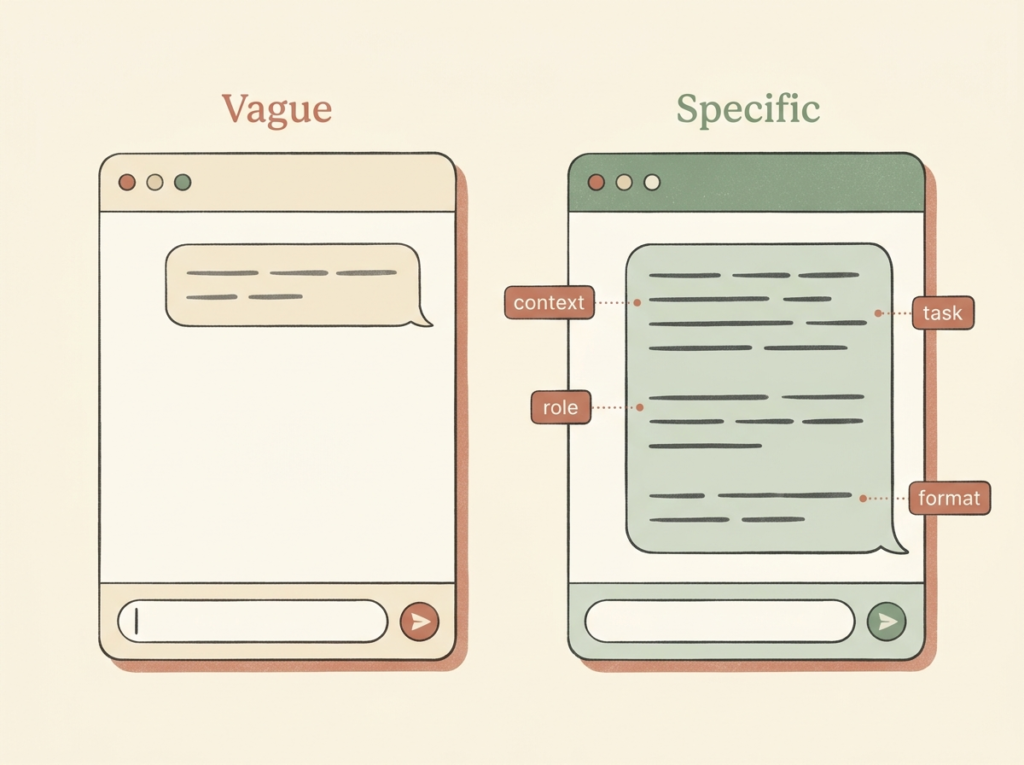
Bad: “Write an email to a client.”
Good: “You’re an experienced bookkeeper writing to a long-time small business client (a local florist). Their Q3 books look healthy, but I noticed their advertising spend doubled with no revenue increase. Write a friendly but direct email of about 200 words that flags the pattern, asks if it was intentional, and offers to hop on a 15-minute call. Keep my voice warm and casual. Sign it ‘Maria.’”
The second prompt produces a publishable email on the first try. The first prompt produces something you have to rewrite from scratch.
10 Plug-and-Play Prompt Templates
- “You’re an experienced [role]. Write a [length] [output type] to [audience] about [topic]. Tone: [tone]. Goal: [goal]. Include: [must-haves].”
- “Summarize the following [document/transcript/email thread] in 5 bullet points, then list every action item with the person responsible.”
- “Rewrite the text below to be [more concise / friendlier / more formal / clearer for a non-technical audience]. Keep the meaning identical.”
- “Give me 10 different headlines for a blog post titled [title]. Vary the angles: some curiosity-driven, some list-based, some how-to.”
- “Act as a skeptical customer. Read this proposal and tell me every objection or hesitation you’d have.”
- “Turn this long-form blog post into 7 social media posts: a mix of LinkedIn (longer, professional), Twitter/X (short, punchy), and Instagram (warm, casual).”
- “You’re a marketing strategist. Based on the business description below, identify the top 3 content marketing topics I should focus on for the next 90 days, with 5 article ideas under each.”
- “Draft a polite but firm follow-up email for a client who hasn’t paid an invoice. The invoice is [X days] overdue. Tone: assumes the best, makes paying easy, proposes a deadline.”
- “Given this meeting transcript, extract: 1) decisions made, 2) action items with owners, 3) open questions, 4) anything that requires my follow-up.”
- “Explain [complex topic] to me as if I’m a smart small business owner with no background in this field. Use a real-world analogy.”
Training AI on Your Brand Voice
The fastest way to make AI sound like you: paste 3 to 5 samples of your best past writing into a single prompt and say, “Here are samples of my writing voice. Study them, then write [new piece] in the same voice.” Tools like ChatGPT’s custom GPTs and Claude’s Projects let you save this voice training, so you don’t have to repeat it.
Common Prompt Mistakes
- Being too vague (“write something good”).
- Skipping the audience (the AI doesn’t know who this is for unless you tell it).
- Asking for too many things at once (one task per prompt; iterate).
- Not specifying length or format (you’ll get whatever the AI feels like producing).
- Accepting the first draft instead of refining (“make it shorter,” “more casual,” “less salesy”; the iterative loop is where the magic is).
Common Mistakes Small Businesses Make With AI
Most AI failures in small businesses don’t come from the AI itself. They come from how owners use it. Here are the patterns that consistently sink AI initiatives.
Treating AI as a Magic Button
AI is a tool, not an oracle. It will confidently produce wrong information, make up statistics, and invent quotes. Treat every AI output as a draft from a smart but unverified intern: trust, but verify.
Not Fact-Checking AI Content
If you’re publishing AI-generated content with specific statistics, names, dates, or quotes, fact-check every one. The AI doesn’t know it’s wrong when it hallucinates; it sounds equally confident either way. The reputational damage from a published mistake is far bigger than the time saved by skipping verification.
Using AI for Decisions That Need Human Judgment
Hiring decisions, firing decisions, sensitive client conversations, anything emotional or political within your team: these are not AI tasks. AI can help you prep, draft, or think through options. It should not be the decision-maker.
Ignoring Data Privacy
When you paste content into a public AI tool, you’re sending it to a third-party server. For a generic blog draft, that’s fine. For client medical records, financial statements, or signed contracts, it’s not. AI ethics in business isn’t an abstract concern; it’s an everyday operational decision. We’ll cover privacy options in a dedicated section.
Subscribing to Too Many Tools
I’ve seen small businesses with $400/month in AI subscriptions and almost nothing to show for it, because they’re using none of the tools well. One tool, used deeply, beats five tools, used shallowly. Always.
Mass-Producing Low-Quality Content
AI lets you publish 50 blog posts a month. Don’t. Google’s algorithms (and your readers) are increasingly good at spotting generic AI slop. You’re better off with two genuinely useful, AI-assisted-but-human-edited posts than 50 algorithmic ones.
Failing to Disclose AI Use When Required
Some industries (like advertising in certain regions) and many platforms now require disclosure of AI-generated content. Check your industry rules and your platforms’ policies. The FTC in the US has been increasingly active on this.
How Much Does AI Cost for Small Businesses?
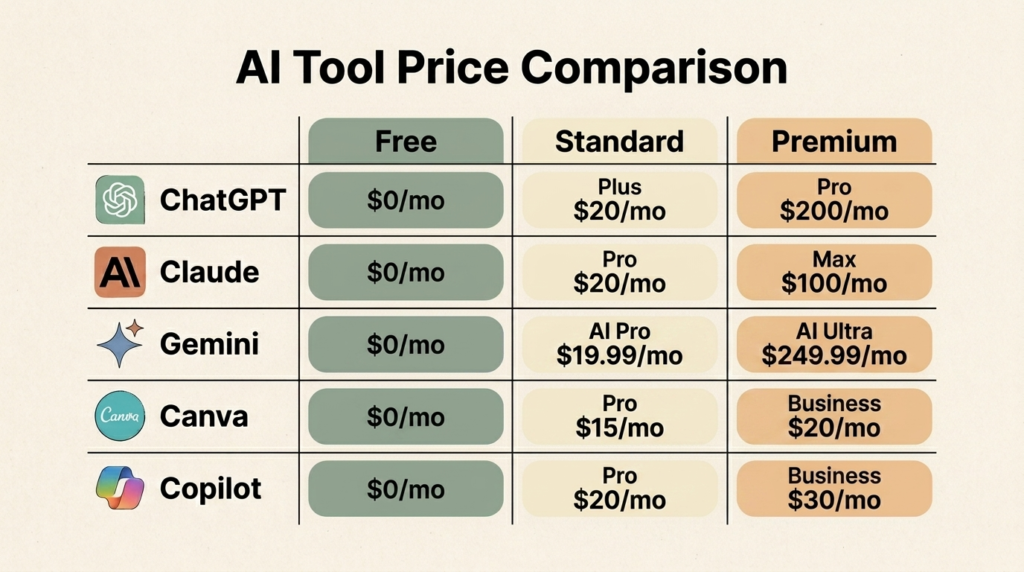
Less than you think. Here’s the realistic breakdown.
Free Tools Every Small Business Should Be Using
ChatGPT (free tier), Claude (free tier), Gemini (free tier and bundled with Google Workspace), Canva (free tier with AI features), Microsoft Copilot (free version), Otter.ai (free tier with 300 minutes/month), and Fathom (free for individuals). You can run a meaningful AI workflow at $0/month for the first 60 to 90 days. Many small businesses never need to upgrade.
The Starter Stack: Under $50/Month
ChatGPT Plus ($20/month), Canva Pro ($15/month), and a meeting note-taker like Fathom Premium ($15/month). That’s $50/month for a setup that can replace tens of hours of work. Most service-based small businesses don’t need anything beyond this.
Mid-Range: $100 to $300/Month
Add Notion AI, Zapier, a dedicated writing tool like Jasper, or specialized industry software. Worth it once you have a clear pain point that the starter stack isn’t solving, not as a default upgrade.
When Premium Tools Are Worth It
Premium tools (think $500+/month for things like Harvey for legal or enterprise Copilot deployments) make sense when you’re using AI as the core of how a service is delivered, not just as an admin assistant. If AI is the product, premium tools probably pay for themselves quickly. If AI is just helping you run admin, the starter stack is plenty.
Hidden Costs to Watch For
- Per-seat pricing on team plans: budgets blow up fast.
- API costs if you build custom integrations: metered usage adds up.
- Storage and document limits on cheaper tiers.
- Annual vs. monthly pricing differences (often 20%+ savings on annual).
Calculating ROI
The simple formula for AI ROI measurement: (hours saved per month) × (your effective hourly rate) − (total monthly AI cost) = your AI ROI. Track it monthly for the first quarter; after that, the answer becomes obvious without the spreadsheet. For most small businesses, even a conservative estimate of 5 hours saved per week at a $50 effective rate gives you about $1,000/month in recovered value against roughly $50 in tools. Anything above 1:1 ROI is gravy. The real question isn’t whether AI pays off; it’s whether you’re measuring it.
AI Privacy, Security, and Legal Considerations
This is the section most AI guides skip. It’s also the one that matters most if you handle sensitive client data.
What Happens to the Data You Paste In
When you paste text into a public AI tool, that text generally travels to the provider’s servers, gets processed, and the response comes back. Many providers retain that data, sometimes to use for training, sometimes just for service operations. Settings differ wildly. Read the privacy policy of any tool before pasting client information into it. Most providers offer business or enterprise tiers with stricter data handling.
Tools That Prioritize Privacy
Claude has historically taken a more conservative posture on training data. ChatGPT Team and Enterprise tiers don’t train on your inputs by default. Microsoft Copilot for Microsoft 365 keeps your data inside your tenant. For maximum control, on-premise or self-hosted models (running on your own machine) keep data fully under your control, but require more setup.
Disclosing AI-Generated Content
The FTC has been clear: deceiving customers about who (or what) created content can be considered an unfair or deceptive practice. Some platforms (TikTok, Meta, YouTube) require AI content labels in many cases. The safe move: when AI is producing customer-facing content, especially in regulated industries, default to disclosing.
Copyright and AI-Generated Content
Copyright law around AI-generated text and images is still evolving. In the US, purely AI-generated work often can’t be copyrighted on its own, though substantially human-edited work usually can. For images, double-check the licensing terms of the tool you’re using; Midjourney, DALL-E, and Adobe Firefly all have different commercial use rules. None of this is legal advice. If you’re publishing AI content commercially at scale, talk to an attorney.
Industry-Specific Regulations
If you handle health data (HIPAA), EU resident data (GDPR), California resident data (CCPA), or financial data (PCI, GLBA), the standard public AI tools are usually not appropriate without specific compliance configurations. Most major providers offer compliant business tiers; the choice is whether to use them, not whether to use AI at all.
Best Practices for Protecting Customer Data
- Never paste personally identifying information (names, SSNs, account numbers, medical details) into a public AI tool.
- Anonymize data before using it in prompts (“Client A” instead of real names).
- Use business or enterprise tiers for any work involving client data.
- Train your team on what is and isn’t okay to put into AI tools.
- Document your AI usage policies, even if it’s a one-page internal doc.
The Future of AI for Small Business (And How to Stay Ahead)
Trends Worth Watching in 2026 and Beyond
AI agents (systems that don’t just answer questions but take multi-step actions on your behalf) are the biggest near-term shift. Instead of “draft me an email,” it’s “follow up with everyone who hasn’t responded to my Q3 proposal.” Voice AI is finally usable for customer service. Multimodal tools (handling text, image, audio, and video together) are merging workflows that used to require separate tools. And small, specialized AI tools for individual industries are exploding. The era of one-size-fits-all AI is ending.
Why Early Adopters Win
The owners who started using AI seriously in 2023 and 2024 have built workflows, prompt libraries, and team practices that compound. The owners who start in 2026 will catch up faster than the original adopters did, but they’re still 12 to 18 months behind on the operational learning. The longer you wait, the wider the gap.
How to Keep Up Without Drowning
You don’t need to read every AI newsletter on the internet. Pick one good source, follow it weekly, and ignore the rest. Block 30 minutes a month to test one new feature or tool. That’s it. The compounding effect of small, regular learning beats panic-binging AI Twitter every six months.
Building an AI-First Mindset
Whenever you start a new task, pause and ask: “could AI do part of this?” Most of the time, the answer is yes, at least for the rough draft, the brainstorm, or the cleanup. These small moves are the highest-leverage AI productivity hacks there are: they cost nothing, compound daily, and don’t require new tools. Over a few months, this question becomes automatic. That’s when AI stops being a tool you remember to use and starts being part of how you work.
Skills That Will Pay Off for Years
Prompt engineering. Critical reading of AI output. Knowing when to trust AI and when to override it. Understanding which tasks benefit from AI and which don’t. Data privacy literacy. None of these require coding. They’re the core literacies of small business digital transformation in the AI era, and all of them will be more valuable in 2030 than they are today.
You Don’t Need to Be Technical
I want to repeat this, because I see so many small business owners count themselves out: you don’t need to be technical to win at this. The best AI users I work with are bookkeepers, contractors, therapists, restaurant owners, and consultants. The skill is judgment and curiosity, both of which you almost certainly already have.
Conclusion: Start Messy, Start Now

Here’s the truth about AI for small business: you don’t need to be tech-savvy, you don’t need a big budget, and you don’t need to overhaul your entire business overnight. What you need is to start.
Pick one tool from this guide. Solve one real problem this week. That’s it. That’s the entire roadmap.
Most small business owners will keep waiting for AI to “make sense” before they jump in. The ones who win are the ones who start messy, learn as they go, and build their AI workflow one piece at a time.
If you only take one action from this article, let it be this: open ChatGPT, pick a task you do every week (writing emails, drafting proposals, brainstorming social posts), and give it a real shot. You’ll be surprised how fast it pays off.
Want practical AI advice delivered to your inbox every Friday? Subscribe to the No Fluff AI Tools newsletter: no spam, no hype, just what works for real small business owners like you.
And if you’re ready to go deeper, check out my full guide to the Best AI Tools for Small Business in 2026 for hands-on reviews of every tool mentioned in this article.
Last Updated: May 2026